CTF Board: A Visual Tool for Tracking CTF Challenges
The Problem
When solving CTF challenges, I kept running into the same issue managing notes and tracking the attack flow was a mess. I tried Notion. I tried Notepad. Neither felt right. I like things visual and in front of me, not buried in pages of text. So I built something.
What Is CTF Board?
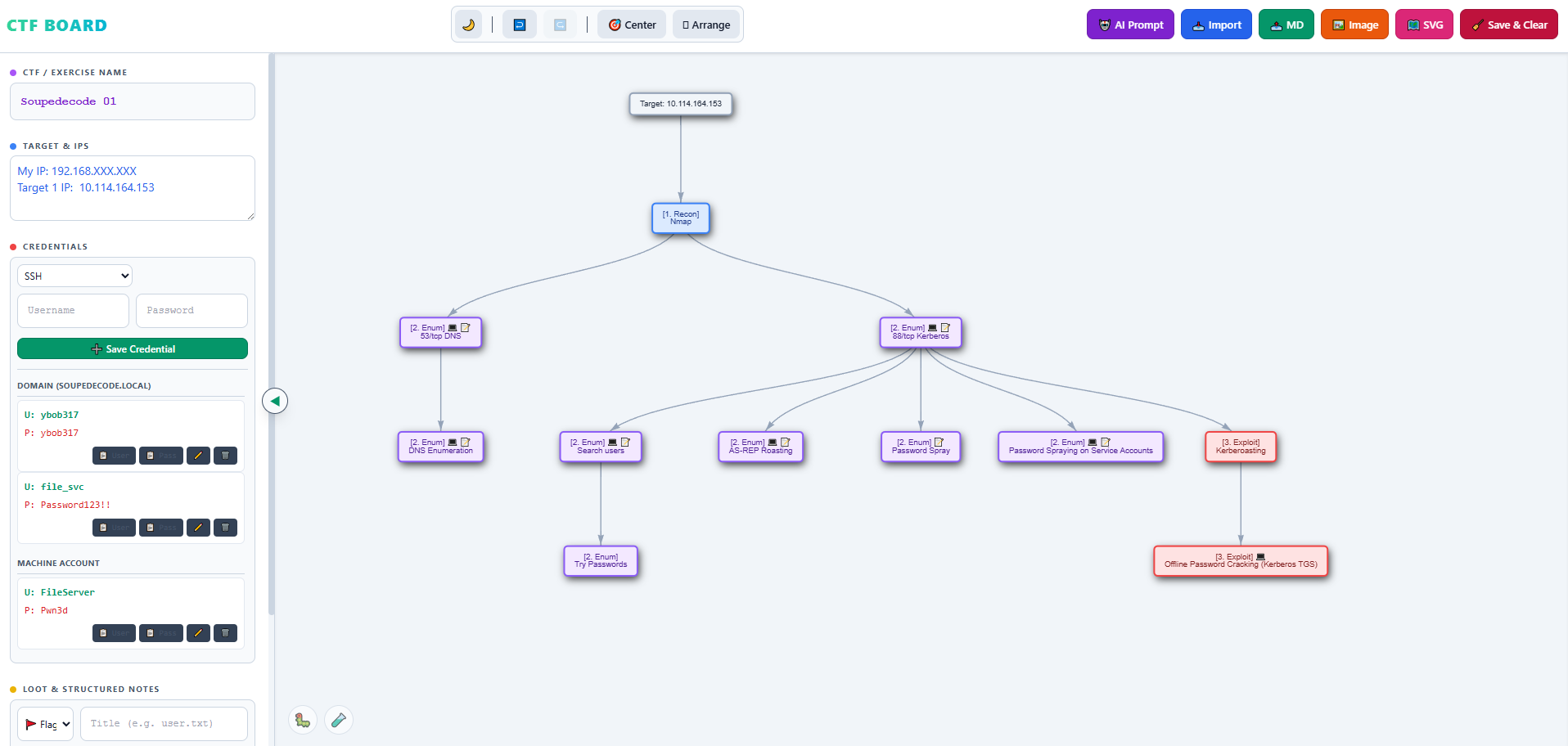
CTF Board is a single HTML file - no install, no setup, no dependencies. Just download and open. It gives you a visual attack tree that represents the challenge as you work through it. Instead of writing everything in plain text, you build a graph that shows the flow of the attack.
The Attack Tree
Each node in the tree represents a step in the challenge. You classify it by phase:
- Recon - initial information gathering
- Enum - enumeration of services and attack surface
- Exploit - the actual exploitation
- Post Exploit - actions after the initial foothold
- PrivEsc -privilege escalation
- Loot - flags, hashes, credentials collected
- Custom - anything that doesn’t fit the above
Each node can hold:
- Command - the exact command you ran
- Output - the terminal output or findings
- Note - your own observations and thoughts
Nodes are color-coded by phase, so at a glance you can see exactly where you are in the attack chain.
Adding Nodes
Right-clicking on any node opens a context menu. From there you can add a child node, connect to another node, rename, or delete. For bulk input, there’s a Bulk Add feature. Instead of adding nodes one by one, you paste a structured list and the tool builds the tree automatically. Each entry can include CMD, OUT, and NOTE fields inline useful after an nmap scan where you want to import multiple open ports at once with their output already attached.
The Left Panel
The sidebar stores everything you need during the challenge:
- CTF / Exercise Name - keep track of which machine you’re working on
- Target & IPs - a free-text area for IP addresses and quick notes
- Credentials - saved per service type: SSH, FTP, SMB, RDP, Web, Database, Kerberos, or Custom
- Loot & Notes - structured storage for Flags, Accounts, Hashes/Keys, and free-form Info or Notes
Everything auto-saves to localStorage as you work.
Export Options
When you’re done (or want to take a break), you can:
- Export to SVG - a visual snapshot of the graph
- Export to Markdown - a structured text file you can re-import later to restore the full board
- Export image - a PNG of the current graph
- Save & Clear - downloads the Markdown automatically before wiping the board, so you never lose work
Why It Helps
The structure forces you to think in phases. When everything is mapped visually, it’s easier to spot what you’ve already tried, what paths are still open, and what you’re missing. Since I started using it, I find I move through challenges more methodically and with less context-switching.
Download
No install needed. Just download the HTML file and open it in your browser.